Connect Breakpoint Engine to Claude
Connect Breakpoint Engine to Claude and analyze your financing directly through conversation — describe your capitalization structure in plain language, and Claude calls the hosted engine for every deterministic calculation. Setup takes a few minutes on claude.ai; Claude Code is covered further down as an advanced workflow.
Jump to: Connect on claude.ai · First valuation in chat · What a run looks like · Confirm Breakpoint Engine was invoked · Working pattern · Advanced: Claude Code · Troubleshooting
Before you connect
- Create an account and buy an Explore, Round, or Raise pack.
- When Auth0 opens, use the same identity that holds credits on /account (your Claude login can differ — the Breakpoint Engine login must match).
Hosted endpoint: https://cloud.breakpointengine.com/mcp. Leave OAuth client ID and secret empty wherever asked.
Connect on claude.ai — custom connector
New to connectors?
- Requires a Claude plan with custom connectors (Pro, Max, Team, or Enterprise). On Team/Enterprise an org admin may need to add the connector.
- Settings live under your initials → Settings → Connectors (use the web app to set up; mobile connector management may be limited).
- Adding ≠ enabled in chat: after connecting, open the tools / search-and-tools menu (sliders icon in the composer) and toggle the connector on for that conversation.
Steps
- Open Settings → Connectors → Add custom connector.
- Name:
Breakpoint Engine. URL:https://cloud.breakpointengine.com/mcp. - Leave the OAuth client ID and secret fields empty — Claude registers itself via dynamic client registration.
- Click Connect and complete Auth0 (same identity as /account).
- In a chat, enable the connector from the tools menu, then ask your first financing question — the complete example below is a good start.
Claude Desktop uses the same hosted connector: open Settings → Connectors and follow the steps above, where remote MCP connectors are available on your Desktop build.
First valuation in chat
Once the connector is on, describe your capitalization structure in plain language — the engine's schema tooling guides Claude through the rest (schema → estimate → solve). A complete example you can copy, paste, and adapt:
Here's our cap table — please value it with the OPM.

Common stock
- Founders: 6,000,000 shares
- Employee options (granted): 1,200,000 at $0.10 strike, 300,000 at $0.35 strike
- Warrants on common: 150,000 at $0.75 strike

Preferred stock (Series A is senior to Seed)
- Series Seed: 2,000,000 shares, issued at $0.50/share,
  1x non-participating, liquidation preference $0.50 per share, seniority 2
- Series A: 2,500,000 shares, issued at $1.25/share,
  1x participating (no cap), liquidation preference $1.25 per share, seniority 1

Assumptions
- Volatility: 55%
- Risk-free rate: 4.25%
- Time to exit: 3 years
- No dividends, no debt

Backsolve the total equity value from the Series A price of $1.25/share.
Then present the full valuation allocation: per-share values for every
security class, the breakpoint schedule with each tranche's bull-spread
value, and how each tranche's value is allocated across the securities.
The structure that makes this work: share counts and strikes for every class, seniority stated explicitly, participation terms per series, the four assumptions, and — for a backsolve — the observed per-share price of one series. Asking for the allocation, breakpoints, and bull spreads up front matters too: the engine returns all of it in one backsolve response, so one message means one metered run presented in full. For a narrative walkthrough afterward, ask: “Explain every breakpoint in the exit waterfall — who participates in each tranche and why.”
Claude converts the observed per-share price into the aggregate Series A target itself ($1.25 × 2,500,000 =
$3,125,000). That conversion is the one input worth checking before you approve the solve — a per-share target_value silently backsolves to a nonsensically small equity value.
What a run looks like
The screenshots below are unedited output from a live claude.ai session running the prompt above — every number computed by the engine, deterministic and reproducible.
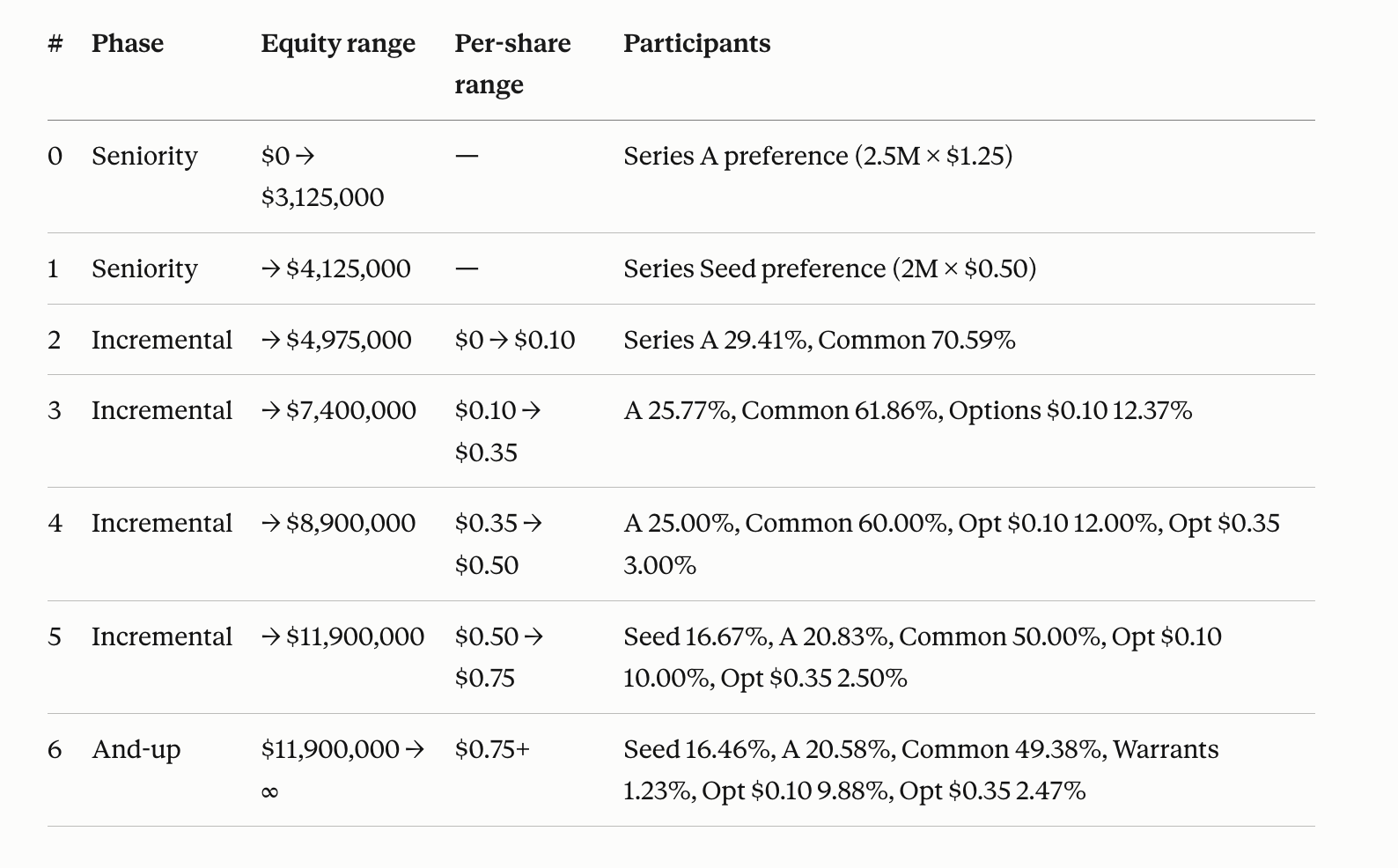
opm_explain_breakpoints returns the schedule structure on its own — seven tranches, each with its equity range, the per-share range it covers, and who participates. Series A takes its $3.125M first on seniority and then participates in every tranche above it; Seed sits out tranches 2–4 and joins at 5, where common crosses $0.50 and converting beats its non-participating preference; the warrants appear only in the and-up tranche at $0.75. Bull-spread values arrive with the metered pricing step.
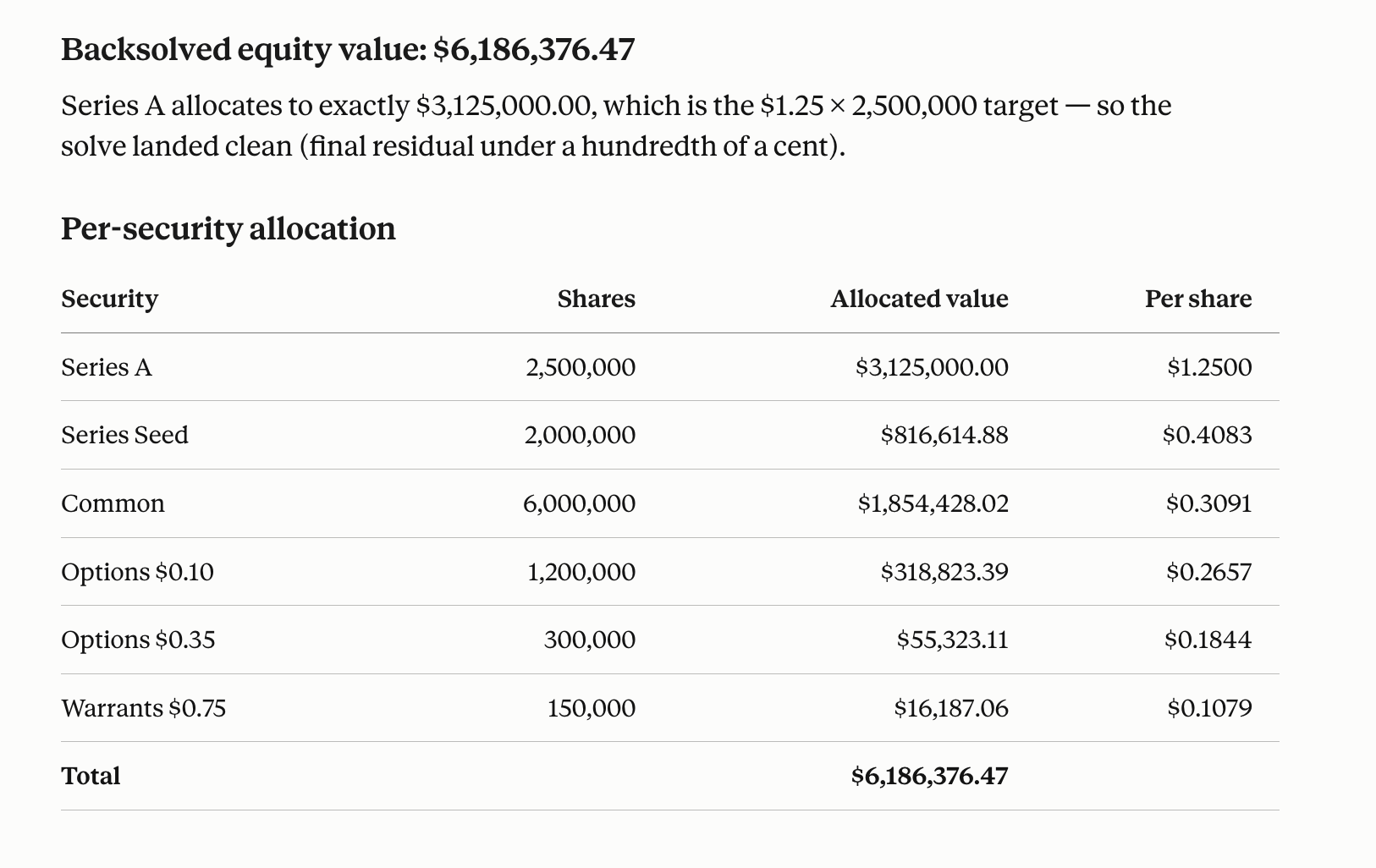
That metered step is the backsolve, and it returns the solved equity value with the full allocation. Series A lands on exactly its $3,125,000 target, which is how you can see the solve closed cleanly:
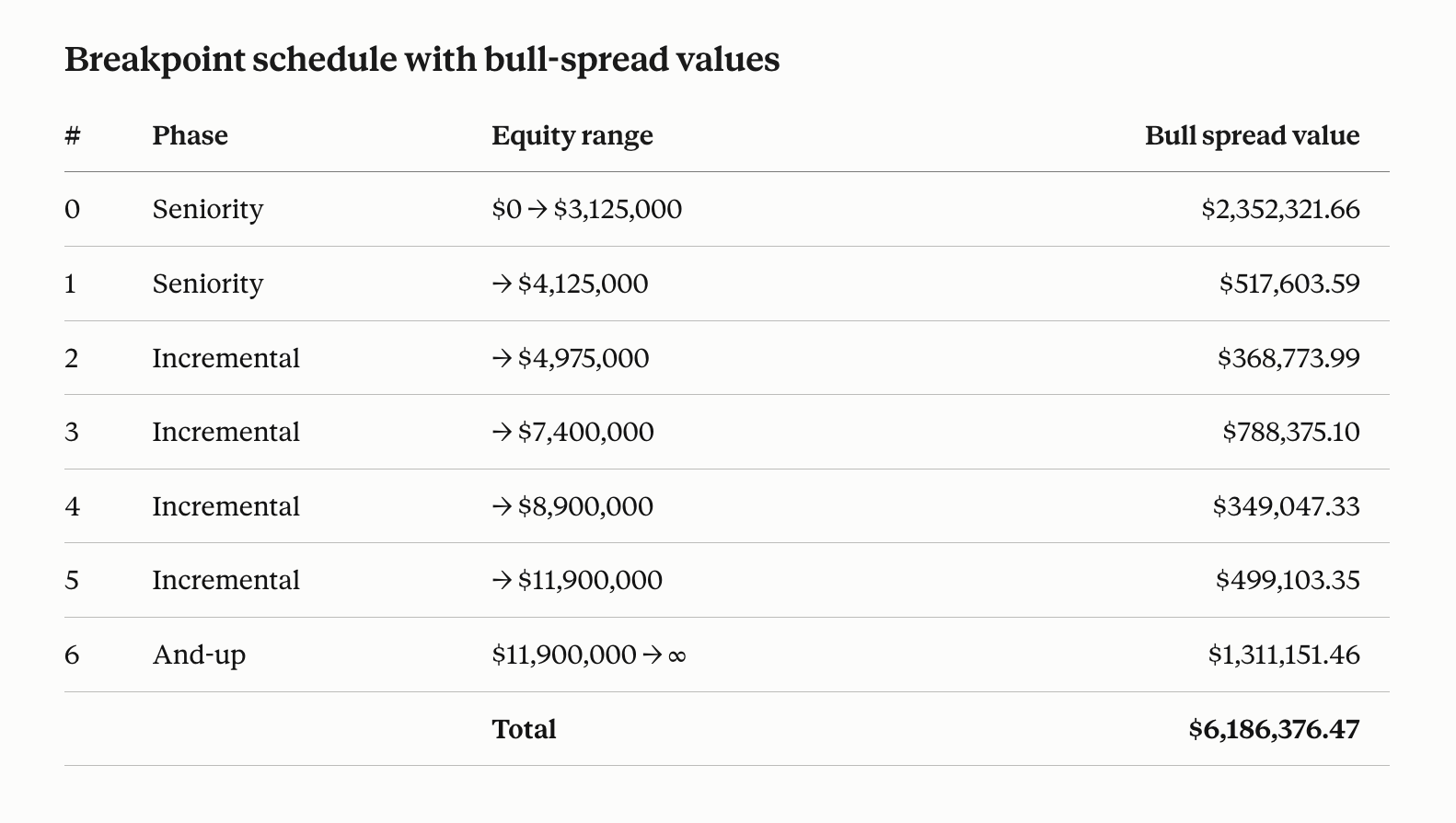
The same schedule, now priced: each tranche carries its Black–Scholes bull-spread value, and they sum to the equity value.
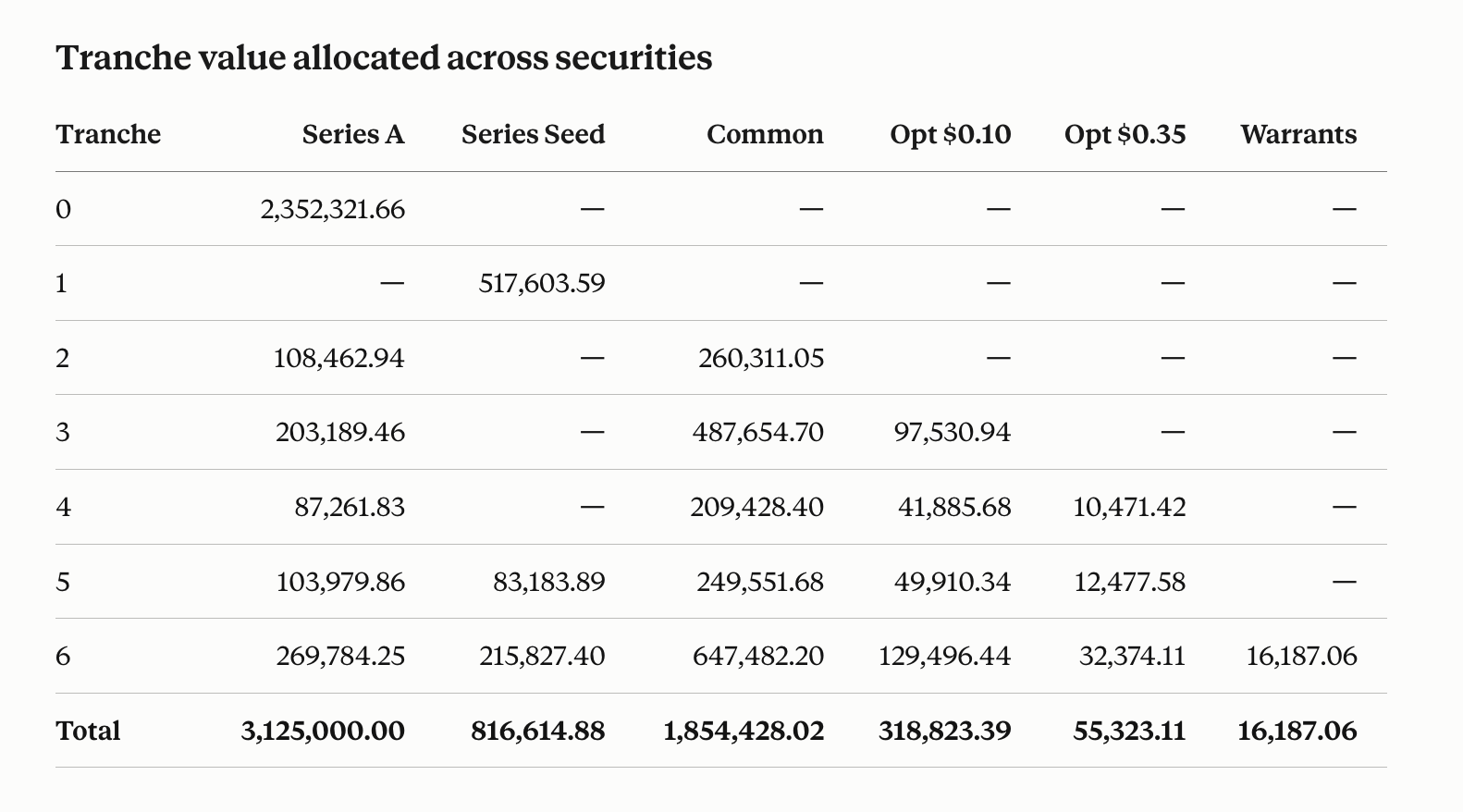
The tranche-by-security matrix shows where that value goes. It reconciles both ways: rows sum to each tranche's bull spread, columns sum to each security's allocated value.
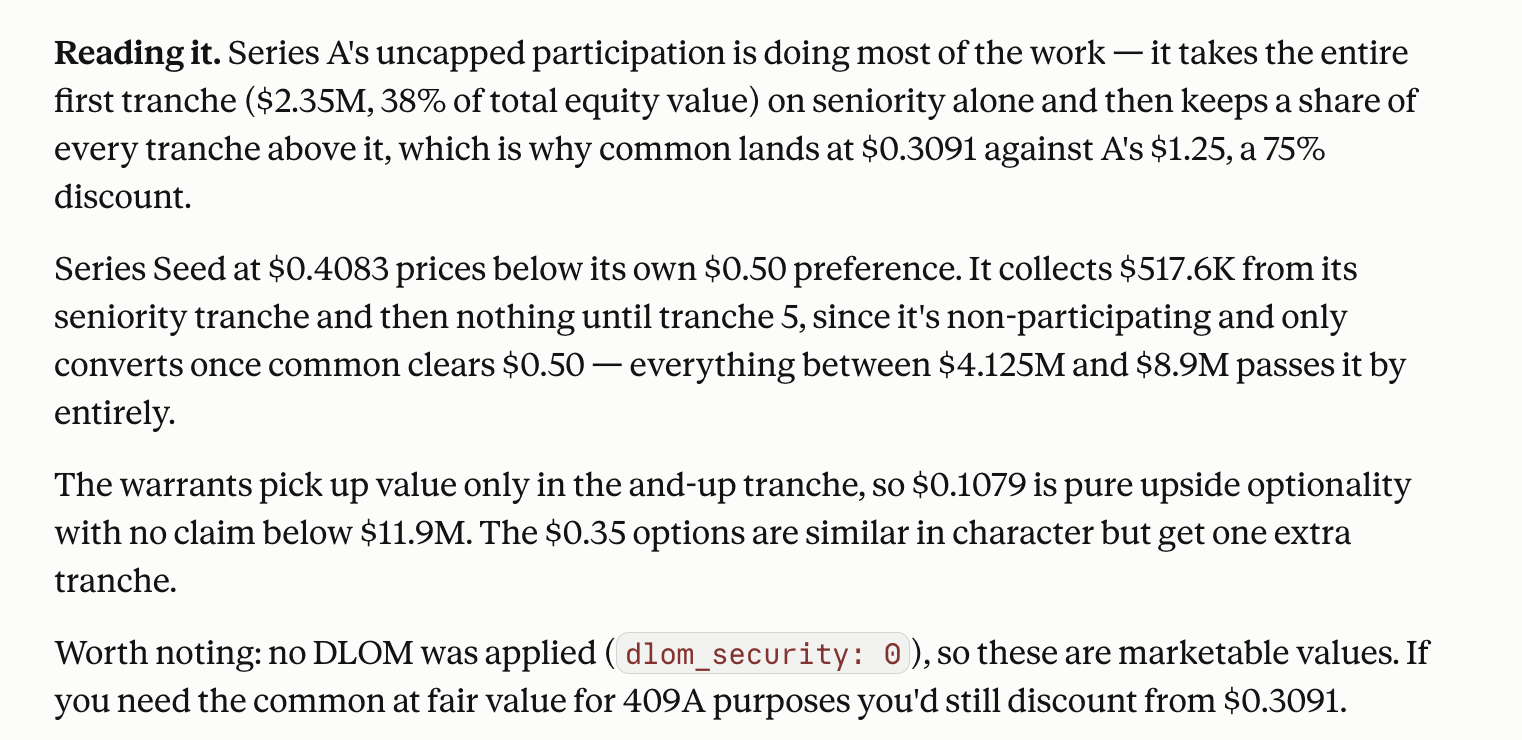
Because the engine returns the full waterfall, Claude can explain what drove it — and state what the run assumed, such as these being marketable, pre-DLOM values:
Confirm Breakpoint Engine was invoked
Claude can reason fluently about valuation on its own — which is exactly why it matters to check that your numbers came from the engine and not from Claude approximating the math. Deterministic numbers come only from tool calls. Three signs of a genuine run:
- Visible tool-call activity in the conversation — expandable tool-use blocks for the estimate and the solve, not just prose with numbers in it.
- Work units consumed from your account balance — an engine run is metered; a Claude approximation costs nothing and moves nothing.
- No hedging phrasing like “I computed this directly” — that is Claude approximating: plausible-looking, but not deterministic, not reproducible, and typically off by real dollars per class.
If you got numbers with no visible tool calls, start a new chat, confirm the connector is enabled in the tools menu, and ask again. Prefer exact control over plain language? Paste your capitalization structure and assumptions in the documented JSON format instead and confirm before solving.
Working pattern
- Prepare your capitalization inputs in the documented JSON format, or describe them in plain language.
opm_estimatefirst (solves are metered): quotework_expectedas the cost. The gateway sizes the job, admits it against your balance, and caps the charge at its own quote. For a backsolve, the estimate should carry the sametarget,tolerance, andmax_iterationsthe solve will use.- For a backsolve, seed
equity_valuenear the equity value you expect — the post-money, or the target divided by that security's expected ownership. The answer comes out the same for any seed — the seed sets the work needed to find it, andopm_estimateprices it before you spend. opm_forwardsolve/opm_backsolvefor full runs, oropm_scenario_begin→ step / query / mutate → commit for interactive round design.
Full tool list: tool reference.
Advanced: Claude Code
Claude Code is the Claude desktop agentic coding CLI — an advanced workflow for technical founders and developers who keep scenario files, capitalization data, notes, and analysis in a local project while Breakpoint Engine computes in the cloud. It connects to the same hosted endpoint. Install and log in first: Claude Code docs.
New to MCP in Claude Code?
- Three config scopes:
--scope user(all projects, in~/.claude.json),--scope project(shared.mcp.jsonin the repo), and--scope local(just you, just this repo). The steps below useuser. - Project
.mcp.jsonasks for approval the first time you open a folder that defines servers. Declining hides the server — re-approve via/mcp. - Check status from the shell:
claude mcp listshows Connected / Needs authentication / Failed to connect. - Servers load at session start — after
claude mcp add, restart Claude Code or open a new conversation before looking for the server in/mcp.
Steps
- Add the hosted server (user scope):
claude mcp add --transport http --scope user breakpointengine-cloud \
  https://cloud.breakpointengine.com/mcp
- Restart Claude Code or start a new conversation (servers load at session start).
- Inside Claude Code, run
/mcp, select breakpointengine-cloud, and complete the browser Auth0 flow. - Confirm the server shows as connected, then ask your first financing question — the same plain-language prompt from First valuation in chat works here too.
List or remove later:
claude mcp list
claude mcp remove breakpointengine-cloud
Troubleshooting
claude.ai / Desktop
- Connector fails to add from
breakpointengine.com/mcp— that URL is this documentation site, not the server. Claude fetches an HTML page, gets no MCP handshake, and the connector never comes up. The endpoint ishttps://cloud.breakpointengine.com/mcp— note thecloud.subdomain. - No “Add custom connector” button — plan lacks connectors, or you need an org admin on Team/Enterprise.
- Connector added but Claude never uses it — enable it in the chat tools menu, then ask for a tool by name.
- OAuth window never appears — allow popups for claude.ai and retry Connect.
- Connector added but nothing connects at all — custom connectors reach the server from Anthropic's infrastructure, not from your machine (this holds for Desktop too). Claude Code connects directly from your machine, so adding the same URL there is a quick way to tell a server problem from a connector-path problem.
Claude Code
already exists in user config— already installed; run/mcpto authenticate, orclaude mcp remove breakpointengine-cloud -s userthen re-add.- Server missing from
/mcpafter add — restart Claude Code or start a new conversation. - Failed to connect while the endpoint is healthy — stale OAuth:
/mcp→ select server → Clear authentication, then reconnect.
All Claude surfaces
- Connection failed immediately — confirm the URL is exactly
https://cloud.breakpointengine.com/mcpand that you can sign in at /account. - Registration / OAuth error — leave client ID/secret blank.
- Connects but tools return 401 — reconnect so the token is issued for the same account that holds credits.
- 402 / insufficient_credits — your balance cannot cover the solve. See Out of credits mid-run below.
- Backsolve returns a nonsensically small equity value —
target_valueis the security's aggregate allocated value, not a per-share price. Multiply: $1.25 × 2,500,000 = $3,125,000. Ask Claude to state the aggregate target before it solves. - You got numbers, but no visible tool calls — Claude approximated the valuation itself. See Confirm Breakpoint Engine was invoked.
Out of credits mid-run
The most common stop, and the easiest to clear. Solves are metered: the gateway authorizes work units
against your balance before pricing anything, so a run can get all the way to a complete breakpoint
schedule and then stop at the solve. opm_schema, opm_estimate, and opm_explain_breakpoints keep answering on an empty balance — you get the structure, just not the
values.
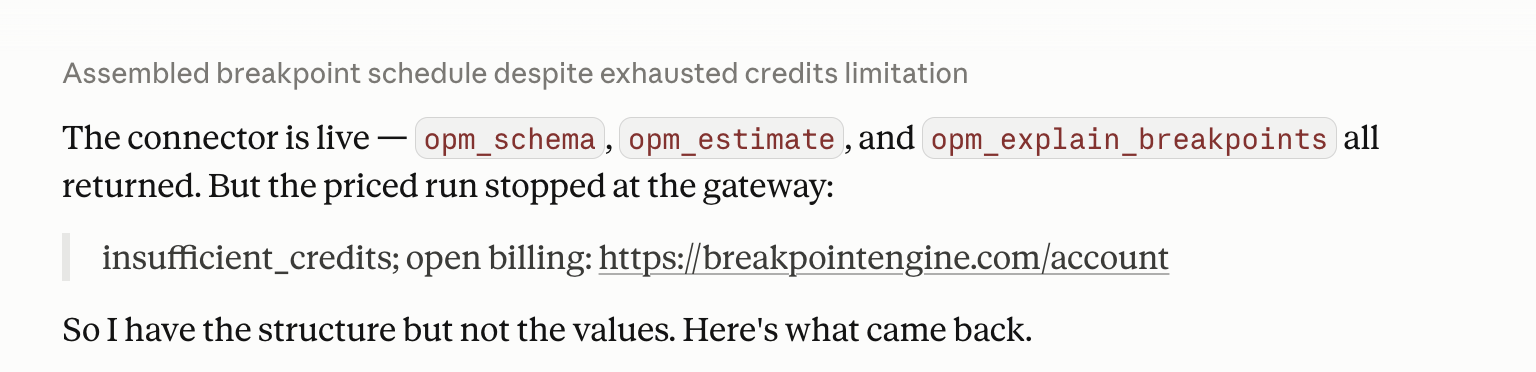
To clear it, without losing the conversation:
- Open breakpointengine.com/account in a browser and buy an Explore, Round, or Raise pack. The purchase happens on the site in your browser, and the conversation keeps its place while you do it.
- Confirm you bought them on the same identity the connector authorized with. A balance on a different account looks identical to no balance at all.
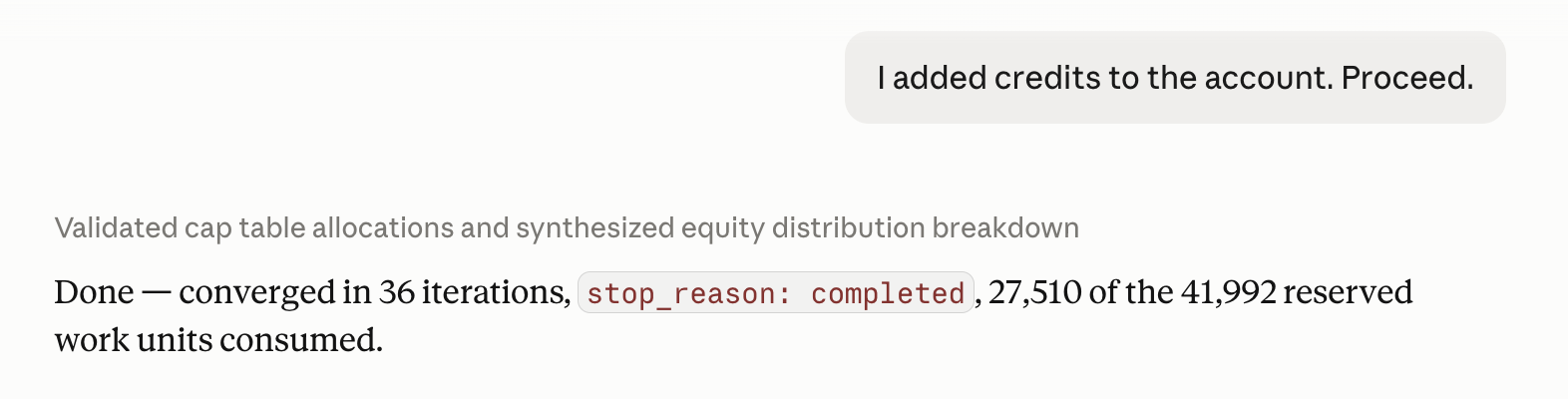
- Go back to the same conversation and tell Claude to proceed — “I added credits to the account. Proceed.” is enough. It still has your capitalization structure, the schedule, and the estimate in context, so it re-runs the solve without you re-pasting anything.
Work units are authorized up front against the gateway's own admission figure (the estimate's work_min, floored at 100 units) and settled on what the run actually consumed —
capped at the gateway's own work_max quote, with any overrun absorbed, so a solve that finishes
early only bills what it used. The cost lever is the job itself: if a run looks expensive, re-seed equity_value closer to the answer on a backsolve, or loosen tolerance, then
re-estimate.
Also see ChatGPT setup, Cursor & VS Code setup, MCP overview, and the tool reference.